
| Quick Answer
A digital document management system replaces physical filing — cabinets, printed forms, courier-delivered paperwork — with a fully electronic process for creating, approving, storing, and retrieving documents. The shift isn’t just scanning paper; it means the entire lifecycle of a document, including approvals and signatures, happens digitally from the start. |
What “Going Digital” Actually Means for Documents
A lot of organizations think they’ve gone digital because they scan incoming paperwork and save PDFs to a shared folder. That’s digitization, not a digital document management system. The real shift happens when documents are created, reviewed, approved, and signed electronically from the start, with the physical version — if one exists at all — becoming a byproduct rather than the original.
This matters because scanned paper trapped in folders is still hard to search, still requires someone to manually track versions, and still depends on people remembering where they saved things. A digital document management system removes paper from the workflow itself, not just from the filing cabinet.
The Real Cost of Staying on Paper
Paper-based processes cost money in ways that don’t show up as a single line item: staff time spent printing, filing, and retrieving documents; physical storage space; courier or postage costs for anything requiring a wet signature; and the risk of a single physical copy being lost, damaged, or simply misfiled. None of these costs are dramatic individually, which is exactly why they tend to persist — there’s rarely a single moment that forces the switch.
What a Digital System Replaces, Step by Step
A physical inbox becomes a digital intake queue. A filing cabinet becomes a searchable, permission-controlled repository. A signature routed by hand or courier becomes an e-signature completed in minutes. A manual approval walked from desk to desk becomes an automated workflow that notifies the next approver automatically and flags anything sitting too long. Each of these replacements removes a step where a document could get lost, delayed, or duplicated.
Handling the Transition Period Without Disrupting Operations
Few organizations can flip a switch and move entirely off paper overnight, and trying to force that tends to create more disruption than it solves. A more workable approach runs both systems in parallel for a defined transition window — new documents created digitally from day one, while a scanning project gradually brings historical paper archives into the system in the background, prioritized by which records are actually still being actively referenced.
This also gives staff time to build confidence in the new system before the physical safety net of paper is fully removed, which tends to produce a smoother, less resisted transition than an abrupt cutover.
Security Considerations When Moving Off Paper
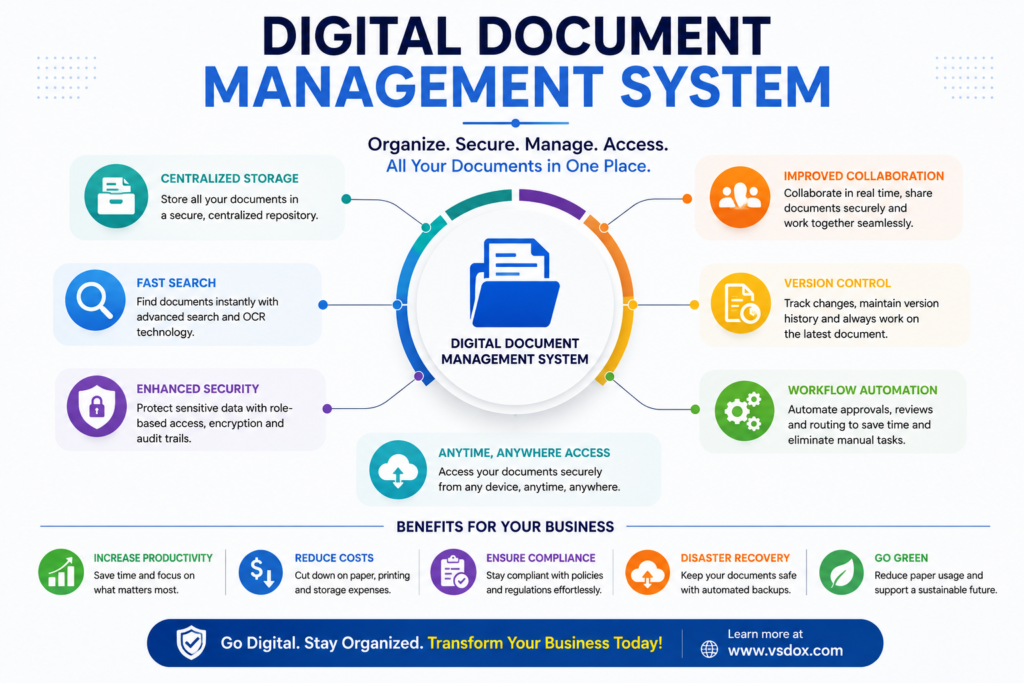
Digital documents need their own security model — encryption in transit and at rest, role-based access, and a clear audit trail of who has viewed or changed a file. This is often actually a security improvement over paper, where a physical folder left on a desk or a filing cabinet without a lock offers essentially no access control at all. The key is choosing a system where these protections are built in by default, not configured after the fact.
Managing the Change, Not Just the Technology
The technical migration to a digital document management system is usually the easier part. The harder part is changing habits that may have been in place for years — staff who are used to printing a document to review it, or a manager who prefers a physical signature because that’s what they’ve always trusted. Acknowledging this openly, rather than assuming the technology alone will drive adoption, tends to produce a smoother rollout.
A practical approach is to pick one process with a clear, visible pain point — a slow approval chain or a document that’s gone missing before — and digitize that first. A quick, visible win builds internal support for expanding the system further, which is a more effective strategy than announcing a company-wide, all-at-once switch to paperless.
How VSDox Supports the Transition
VSDox is designed for organizations making this move for the first time, with OCR-based scanning to bring existing paper archives in searchable, built-in e-signature so approvals don’t need a separate tool, and configurable workflows that mirror how paper used to move through the office — just without the physical handoffs. Where platforms like KRYSTAL DMS focus heavily on records-management compliance for government and large institutions, VSDox is built to get a mid-sized business fully off paper without a lengthy change-management project.
Because the platform is cloud-based, teams working across multiple office locations or remotely can access the same digital repository without needing a physical document to be couriered or hand-delivered — which, for many organizations making this transition, is the single most immediately felt benefit of going digital.
For organizations with multiple branches or field offices, this also removes a dependency that paper-based processes often create almost by accident: a head office that can only move as fast as the slowest branch’s courier schedule. A digital repository removes that bottleneck entirely, since every location works from the same live system rather than waiting on physical documents in transit.
Frequently Asked Questions
What is the difference between scanning documents and having a digital document management system?
Scanning converts paper to digital images, but without a management system those files still sit in unstructured folders. A digital document management system adds search, version control, permissions, and workflow on top of the digitized files.
How long does it typically take to go paperless with a digital document management system?
It depends on document volume and how many departments are involved, but most organizations start with their highest-volume document type (like invoices or contracts) and expand from there over a few months.
Are e-signatures legally valid in a digital document management system?
Yes, in most jurisdictions e-signatures carry the same legal standing as wet-ink signatures under laws such as the ESIGN Act in the US or the IT Act in India, provided the platform maintains an audit trail of the signing process.
What happens to old paper archives when switching to a digital system?
They’re typically scanned in a batch digitization project, run through OCR to make the text searchable, and then either stored physically as a backup or securely disposed of according to the organization’s retention policy.
Does a digital document management system work for remote or hybrid teams?
Yes — because documents are centrally hosted and accessed through the web rather than a physical location, digital systems are generally easier for distributed teams to work with than paper-based filing.