Quick Answer
Paper-based processes cost businesses far more than printing and storage – they add hidden costs in retrieval time, compliance risk, and lost documents. A digital document management system eliminates most of these costs by digitizing and centralizing records.
Paper Is More Expensive Than It Looks
Most businesses don’t track the true cost of paper. They track ink, printer leases, and storage rent as separate line items, never adding them up into one number. When they do, the total is usually shocking.
A Digital Document Management System replaces that scattered cost structure with one digital workflow. This article breaks down what paper actually costs a typical business, what a digital system replaces it with, and how one healthcare provider used the switch to cut costs while improving patient record access.
The Real Cost of a Paper-Based Office
Industry estimates from AIIM and PwC studies on document handling put the average cost of producing one paper document, including printing, filing, storage, and retrieval labor, at several dollars once labor time is included.
Add these up across a mid-sized office and the picture becomes clear:
- Printing and toner costs that recur monthly with no return.
- Off-site or on-site storage rent for boxes of records that may never be opened again.
- Staff hours lost searching for misfiled paperwork.
- Costs of re-creating documents that are lost, damaged, or destroyed.
- Courier and mailing costs for physically routing documents for signature.
None of these costs show up as a single bill, which is exactly why they go unmanaged.
What a Digital Document Management System Replaces
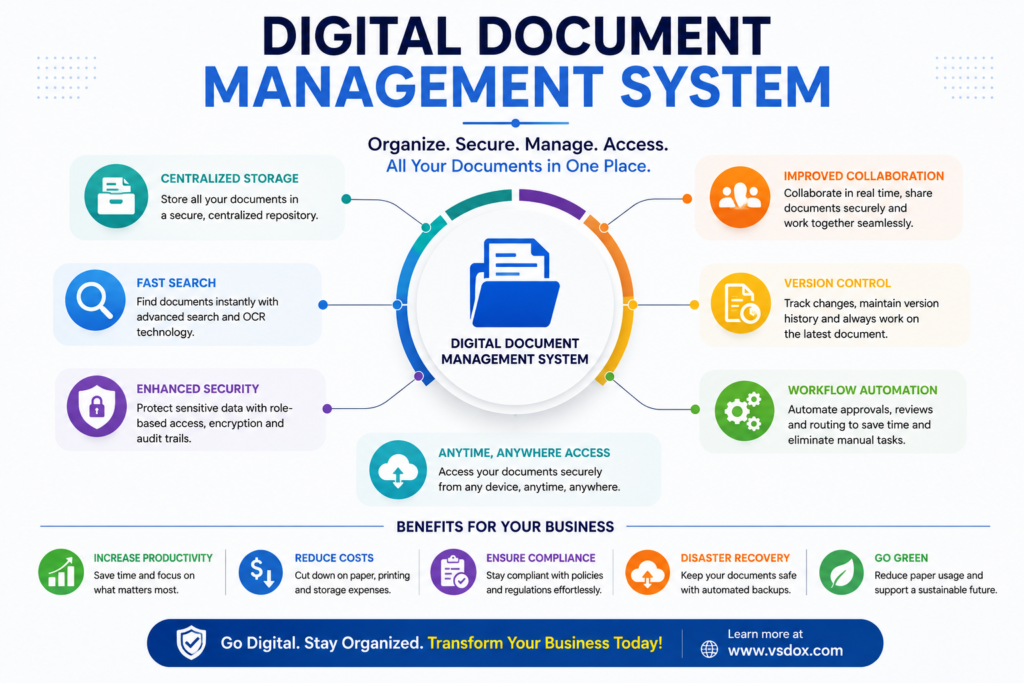
A Digital Document Management System (DDMS) is a centralized platform that captures, stores, indexes, and manages documents electronically across their entire lifecycle, replacing filing cabinets, shared drives, and printed approval chains with one searchable environment.
Where paper requires physical handling at every step, a digital system automates it. Typical capabilities include:
- Bulk and mobile document scanning with OCR text recognition
- Centralized cloud storage with version history
- Electronic signatures and approval routing
- Retention scheduling with automatic archival or deletion
- Role-based access instead of physical key or cabinet control
Case Study: A Multi-Clinic Healthcare Group Goes Paperless
A healthcare group operating six clinics previously stored patient intake forms, insurance documents, and treatment records in physical folders at each location. Records could only be accessed from the clinic where they were filed, which created delays whenever a patient visited a different location.
After deploying a Digital Document Management System across all six clinics:
- Patient records became accessible from any clinic within seconds.
- Physical storage space previously used for filing cabinets was converted into additional treatment rooms.
- Printing and paper costs dropped substantially within the first year.
- Staff onboarding time for record-handling procedures was reduced, since training shifted from physical filing rules to a single software interface.
The clinic group did not just save money. It freed physical space and reduced the administrative burden on front-desk staff.
Paper vs. Digital: A Cost Comparison
| Cost Category | Paper-Based Process | Digital Document Management System |
| Storage | Recurring rent for boxes and cabinets | Cloud storage, scalable on demand |
| Retrieval | Manual search, minutes to hours | Keyword search, seconds |
| Approval routing | Physical signatures, courier delays | Electronic signatures, same-day |
| Disaster risk | Fire, flood, or loss destroys originals | Redundant backups, recoverable |
| Environmental impact | Ongoing paper and toner consumption | Minimal physical material use |
Steps to Move From Paper to Digital
- Audit existing paper volume by department to estimate scanning workload.
- Prioritize high-frequency documents first, such as invoices or active contracts, over rarely-accessed archives.
- Set retention rules before scanning, so digital storage doesn’t simply recreate paper clutter.
- Train staff on search and approval workflows, not just on how to upload files.
- Phase out paper gradually by department rather than attempting an all-at-once cutover.
How VSDox Supports the Transition to Paperless
Businesses moving away from paper-based processes can use VSDox to manage the entire transition from a single platform.
- Bulk document scanning and OCR-based indexing
- Centralized, searchable cloud repository
- Configurable retention and archival policies
- Electronic approval and signature routing
- Usage reporting to track paper and cost reduction over time
Learn more at vsdox.com
Frequently Asked Questions
How much can a business realistically save by going paperless?
Savings vary by document volume, but most organizations see measurable reductions in printing, storage, and labor costs within the first year of adoption.
Do all documents need to be scanned immediately?
No. A phased approach starting with active, frequently used documents typically delivers faster returns than scanning entire archives at once.
Is a Digital Document Management System only useful for paper reduction?
Paper reduction is one benefit. Most organizations also gain faster retrieval, better security, and improved compliance as a result of digitization.
What happens to old paper records after digitization?
Organizations typically retain originals for a defined period based on legal requirements, then securely dispose of them once digital copies are verified.
Conclusion
The cost of paper rarely appears as one line item, which is exactly why it goes unmanaged for so long. A Digital Document Management System turns scattered, invisible costs into a single, measurable, and shrinking number, while freeing physical space and reducing operational risk.
Businesses that quantify their paper costs before going digital tend to make the switch faster and see the return sooner.
How much does paper-based document management actually cost a business?
Beyond printing and storage, paper processes add hidden costs from retrieval delays, lost documents, and compliance risk that often exceed the visible expenses.
How can a business reduce paper-related costs?
Digitizing existing paper records with OCR and moving to a centralized digital document management system significantly cuts printing, storage, and retrieval costs.
Does going paperless improve compliance?
Yes, digital systems make it easier to track document history, enforce retention policies, and maintain audit trails required for compliance.